You recorded a 40-minute webinar. It took a week to plan, a morning to record, and an afternoon to edit. Then it went out once, collected a few hundred views, and disappeared.
Content repurposing fixes that. Instead of starting from zero every time you need a post, you take one strong piece and reshape it for every place your audience spends time. This guide shows you how to do it as a system: what to pick, what to make from it, how to adapt it, and what to check before anything goes live.
What is content repurposing?
Content repurposing means adapting an existing idea or piece of content into a new format, angle, or platform-specific asset. Instead of publishing the same thing everywhere, you reshape it so it works natively for a different audience, channel, or stage of the funnel.
Content repurposing vs reposting vs cross-posting
Repurposing changes the content. Reposting and cross-posting share it again with little or no change. All three have a place, but only repurposing creates something new.
Cross-posting saves time, but a horizontal YouTube video with a “link in description” CTA rarely works on TikTok. Good repurposing adapts the content. It does not just copy and paste it.
Why repurpose content?
Repurposing gets more return from the content you already paid for in time, money, or effort. Here is where that return shows up:
- Higher value from expensive assets. A webinar, interview, or product demo takes hours to produce. Splitting it into ten asset spreads that cost across ten publishing slots.
- Consistency without starting from scratch. Your ideas and research are already done. You are editing and adapting, which is faster than writing or filming something new.
- Reach across formats. Some people watch Shorts, some read LinkedIn, and some only open email. One idea can meet each of them where they are.
- Longer life for strong ideas. A good argument from last spring is still a good argument. Repurposing keeps it in circulation.
- Built-in testing. Five clips from one video mean five different hooks. The winners tell you what your audience cares about.
- Better search and social distribution. A transcript-based article can rank in search, while clips drive discovery on social and point people back to the full piece.
What content should you repurpose?
Repurpose content when the idea is strong, not just because the file exists. Start with pieces that tick at least two of these boxes:
- Already performing well (views, saves, replies, conversions)
- Evergreen, so it stays useful for months
- Based on original expertise, data, or experience
- Expensive or time-consuming to produce
- Rich enough to split into several standalone ideas
- Still relevant to what your audience wants right now
Skip content that is outdated, contains expired time-sensitive information, or only worked because it rode a platform-specific trend. Be careful with low performers: weak reach often comes from weak packaging, not a weak idea. A useful point that flopped as a long video may land as a carousel or a 30-second clip with a sharper hook.
What can one piece of content become?
One long-form asset can usually feed five to ten smaller ones. These content repurposing examples map common starting points to the formats they convert into most naturally.
Build a simple content repurposing strategy
A content repurposing strategy starts with a goal, then sets a fixed mapping from the content you already make to the outputs you publish. Without the goal, you end up with more assets and no way to tell whether the system worked.
Pick one primary goal per source. Each goal changes what you make and what you measure:
Track production time for every round too. If a source takes four hours to turn into eight assets and only two of them perform, cut the other six next time.
Then turn it into a routine:
- Choose one or two pillar formats, such as a weekly video or a monthly webinar.
- Map each source to the outputs that serve your goal.
- Assign an owner to each output, even if that owner is you.
- Create templates and checklists so each round is faster.
- Review results monthly and double down on what works.
For example, if your goal is qualified traffic, every webinar might become 1 YouTube video, 1 blog post, 2 LinkedIn posts, and 1 newsletter, with clips playing a supporting role. For a longer planning view, see this 90-day content plan.
A practical content repurposing workflow
A repeatable content repurposing workflow has six steps: choose a source, extract ideas, match ideas to formats, adapt for each platform, edit and package, then review before publishing.
- Choose the source asset. Pick one high-value piece: a webinar, long-form video, interview, blog post, product demo, or livestream recording.
- Pull out the strongest ideas. Do not cut content just because a section fits a 60-second slot. Look for the strongest argument, the best quote, a useful tutorial moment, a surprising data point, a common question, or a strong emotional moment.
- Match each idea to a format. A tutorial segment becomes a short vertical video. A data point becomes a carousel. A strong quote becomes a LinkedIn post. A detailed explanation becomes a blog section.
- Adapt for the platform. Change the hook, length, framing, captions, visual format, and CTA so each piece feels native to where it lands.
- Edit and package. For video, this is where most of the work happens: clip, reframe, caption, clean the audio, add B-roll, resize, and apply your branding.
- Review before publishing. Run every asset through the checklist later in this guide.
Worked example: Turn one long recording into a week of content
Here is how to repurpose video content from one recording, starting with a real edit run in Async. The source is a raw, 87-second talking-head clip of a creator explaining how they started their show in a kitchen and how they turn episodes into short clips. It had fillers, long pauses, and one sentence recorded twice.
Step 1: The real edit. We gave Async’s chat editor one instruction covering the rough cut, audio cleanup, captions, B-roll, and a vertical version.
[Editor note: add the original opening line versus the edited hook, the finished 9:16 clip, and the LinkedIn post or carousel made from the same idea. These need the exported clip from this project.]
Step 2: Map the ideas (illustrative plan). For a full-length recording, skim the transcript and list its five or six distinct ideas. Say one of them is: “Why most creators overproduce content.” That single moment can become:
Then fill the week. Map the remaining ideas the same way. A practical tip becomes a Short. A surprising stat becomes a quote graphic. The best three minutes become the newsletter’s featured section, with a link to the full video.
The lesson: repurpose ideas, not just files. Chopping a video every 60 seconds produces clips with no beginning or payoff. Building each asset around one complete idea produces content that stands on its own.
How to repurpose video content
To repurpose video content, pull standalone moments from a long recording, then rebuild each one for its destination. A clip that works in context often falls flat on its own, so the edit matters as much as the cut.
- Pull clips from long-form video. Look for moments with a clear setup and payoff. Here is how to turn long-form video into short clips.
- Change the aspect ratio. Vertical 9:16 for Reels, Shorts, and TikTok; square or 4:5 for feeds. Learn how to reframe video for different platforms so the speaker stays in frame.
- Rewrite the hook. The first two seconds of a clip need to earn attention without the build-up from the original.
- Add captions. Many people scroll with the sound off.
- Restructure for standalone context. Add a text overlay or a one-line intro if the clip references something said earlier.
- Match the CTA to the next action you want. If you want people to watch the full video, point them there. If you want, follow, tease the next clip. If you have inquiries, send them to a page.
For more on cleanup and pacing, see these video editing tips and how to edit recorded content faster.
How to repurpose content for social media
To repurpose content for social media, match each idea to what the platform rewards. Do not publish the exact same version everywhere.
If Reels are a priority, this guide on how to edit Instagram Reels covers the format in detail.
Already have a YouTube library? Here is how to post a YouTube video on Instagram without it looking like a cross-post.
Repurposing webinars
Webinars are one of the richest sources to repurpose because they combine expertise, slides, and real audience questions. Cut the strongest highlights into clips, turn audience questions into short FAQ videos, and convert key slides into LinkedIn posts or a carousel. The transcript becomes the basis of a blog article, and individual sections can serve sales or onboarding teams as focused explainers.
Repurposing blog content into video
Blog-to-video should be an adaptation, not a narration of the post. Choose one useful idea from the article, rewrite it as a spoken script, and record it as a talking-head video or build it with supporting visuals. Show examples and screens instead of reading paragraphs aloud. A 1,500-word post might give you three focused videos, each under a minute.
AI content repurposing: Where AI actually helps
AI content repurposing speeds up the transformation steps, from finding clip-worthy moments to drafting captions. It works best as an assistant inside your workflow, not as the strategist.
AI is useful for:
- Analyzing transcripts to surface key topics and quotes
- Finding clip-worthy sections in long recordings
- Summarizing long content into outlines and recaps
- Rewriting hooks and headlines for different platforms
- Generating captions and subtitles
- Resizing and reframing video for new aspect ratios
- Creating B-roll and supporting visuals
- Turning one source into first drafts for other formats
Human review still matters for context, accuracy, tone, brand voice, and whether a clip makes sense on its own. AI can tell you a moment is energetic. It cannot always tell you that the moment only lands if viewers saw the two minutes before it.
How Async fits into a content repurposing workflow
Async handles the video layer of repurposing: it helps turn existing footage into multiple finished video assets without rebuilding each edit manually.
A typical flow in Async looks like this:
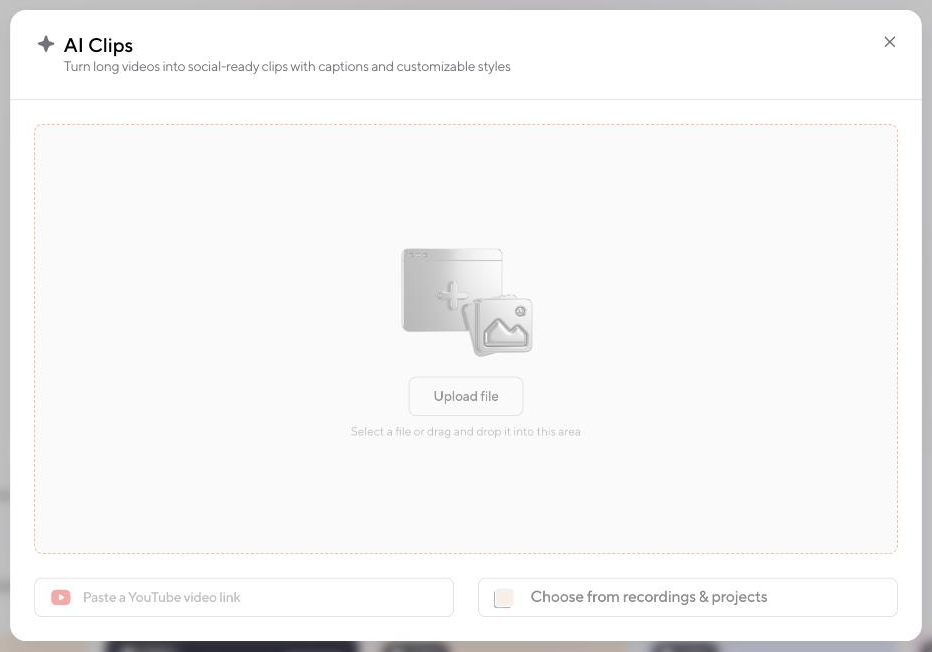
- Upload your long-form video or paste a YouTube link into AI Clips.
- Let AI Clips find highlights and generate social-ready clips with captions in your chosen style.
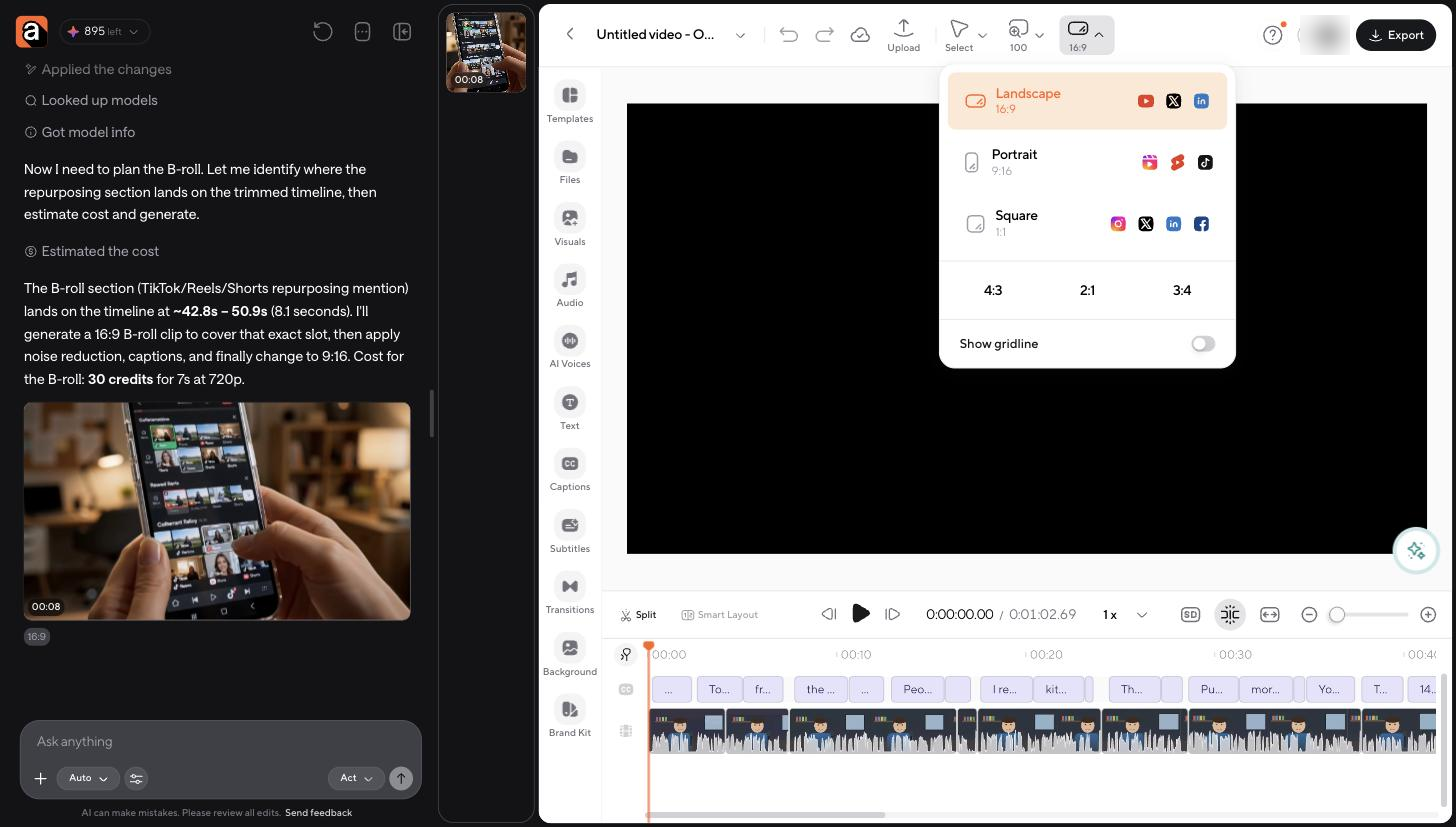
- Reframe for each platform with presets for landscape (16:9), portrait (9:16), and square (1:1).
- Clean up the audio and cut filler words and bad takes.
- Add captions and B-roll, including context-aware AI B-roll that matches B-roll to your video.
- Export platform-specific versions and apply your Brand Kit for consistent styling.
You can also describe the edit in plain language. Async’s chat-based AI video editor can plan cuts from the transcript, apply noise reduction, add captions and B-roll, and switch the format to 9:16 in one request, while you keep full timeline control.
Content repurposing checklist
Before publishing any repurposed asset, check:
- Context: Does the piece make sense without the original?
- Hook: Does the opening work for this platform?
- Format: Is the aspect ratio right?
- Captions: Can it be understood without sound?
- Length: Is it appropriate for the destination?
- Framing: Is the subject properly positioned?
- CTA: Does the call to action match the platform and content?
- Accuracy: Did anything become misleading when shortened?
- Branding: Does it still look and sound like your brand?
- Duplication: Did you adapt the content enough, or just repost it?
Build a simple content repurposing strategy
A content repurposing strategy is a fixed mapping from the content you already make to the outputs you publish every time. Build yours in six moves:
- Choose one or two pillar formats, such as a weekly video or a monthly webinar.
- Decide your recurring output formats.
- Build a repeatable mapping from source to outputs.
- Assign an owner to each output, even if that owner is you.
- Create templates and checklists so each round is faster.
- Review performance monthly and double down on what works.
For example, every webinar becomes 1 YouTube video, 4 clips, 1 blog post, 2 LinkedIn posts, and 1 newsletter. Once the mapping is set, nobody has to decide what to make. They just make it.
Start with one strong piece
Content repurposing works when you treat it as a system with a goal, not a quota. Pick one strong source this week, map it to the formats that serve that goal, and measure what each one earns.
FAQ
What is content repurposing?
Content repurposing is adapting an existing piece of content into a new format, angle, or platform-specific asset. The core idea stays the same, but the structure, length, and framing change to suit a new audience or channel.
What is an example of content repurposing?
Turning a 30-minute webinar into a YouTube video, five short clips, a blog article, a carousel, and three LinkedIn posts. Each asset covers an idea from the webinar, reshaped for its platform.
How do you repurpose content?
Choose a strong source asset, pull out its best ideas, match each idea to a format, adapt it for the platform, edit and package it, then review it before publishing.
How do you repurpose content for social media?
Build each post around one idea and adapt it to the platform: vertical, captioned, fast-paced video for TikTok and Reels, lesson-driven text for LinkedIn, and longer context for YouTube.
What is the difference between repurposing and reposting?
Reposting shares the same content again with little or no change. Repurposing changes the format, angle, or structure so the content works in a new context.
How do you repurpose video content?
Cut standalone clips from long-form video, reframe them for the target aspect ratio, rewrite the hook, add captions, and adjust the CTA for each platform.
Can AI repurpose content?
Yes. AI can find clip-worthy moments, generate captions, reframe video, and draft new formats from a transcript. A human should still review context, accuracy, and brand voice.
What content should you repurpose?
Content that performs well, stays relevant, reflects original expertise, takes real effort to make, and holds several distinct ideas.
How often should you repurpose content?
Whenever the source supports worthwhile outputs. A recording with five distinct ideas can feed five assets, while a narrow update may justify one. Let the material decide, not a quota.
Is content repurposing good for SEO?
Yes, when done well. Turning video or webinar transcripts into articles creates new indexable content, and social clips drive traffic back to your main pages. Avoid publishing near-duplicate text across multiple URLs.
PakarPBN
A Private Blog Network (PBN) is a collection of websites that are controlled by a single individual or organization and used primarily to build backlinks to a “money site” in order to influence its ranking in search engines such as Google. The core idea behind a PBN is based on the importance of backlinks in Google’s ranking algorithm. Since Google views backlinks as signals of authority and trust, some website owners attempt to artificially create these signals through a controlled network of sites.
In a typical PBN setup, the owner acquires expired or aged domains that already have existing authority, backlinks, and history. These domains are rebuilt with new content and hosted separately, often using different IP addresses, hosting providers, themes, and ownership details to make them appear unrelated. Within the content published on these sites, links are strategically placed that point to the main website the owner wants to rank higher. By doing this, the owner attempts to pass link equity (also known as “link juice”) from the PBN sites to the target website.
The purpose of a PBN is to give the impression that the target website is naturally earning links from multiple independent sources. If done effectively, this can temporarily improve keyword rankings, increase organic visibility, and drive more traffic from search results.