You have about two seconds to win a click on YouTube, and your thumbnail is doing all the talking. It’s the first thing people notice, and in most cases, the only thing they use to decide whether your video is worth their time. You could have an amazing idea, great editing, and a strong title, but if your thumbnail doesn’t immediately grab attention, none of that really matters.
This is the part most creators underestimate. Thumbnails are not just visuals, they are decisions. Every color, expression, and word is either pulling someone in or pushing them away. And the frustrating part is that creating something that actually works usually takes hours of testing, tweaking, and second-guessing, especially if you’re not a designer.
That’s exactly why AI YouTube thumbnail generators are becoming such a big deal. They remove a lot of the guesswork, speed up the process, and help you go from idea to multiple high-quality options in minutes. Instead of spending hours in design tools, you can focus on what really matters, which is finding the version that gets people to click. In this guide, you’ll learn how to use AI to create thumbnails that are not just visually appealing but built to perform.
AI YouTube thumbnail generator: Why thumbnails matter more than your video
Quick test. You see two videos on the same topic. Same idea, similar title, similar length. One thumbnail instantly makes sense and sparks curiosity. The other feels flat or confusing. You click the first one without thinking twice.
That decision happens fast, usually in under two seconds.
This is the reality of YouTube. Your thumbnail is not just a visual. It is your pitch. Before anyone hears your voice or sees your content, the thumbnail has already decided whether your video gets a chance.
This is why people say something that sounds harsh but is mostly true: your video does not matter if your thumbnail does not get clicks. No click means no watch time. No watch time means no distribution. And without distribution, even great content stays invisible.
Think of your thumbnail as packaging. Two videos can tell the exact same story, like traveling in Egypt as a woman, but the one with clearer visuals, stronger emotion, and a better hook will always win. Not because the content is better, but because it communicates value faster.
The algorithm follows the same logic. It shows your video to a small group first. If people click, it keeps pushing it. If they do not, it slows down. Click-through rate becomes the gatekeeper, and your thumbnail is the biggest driver behind it.
So improving your thumbnails is not a small optimization. It is one of the highest-leverage changes you can make to your entire channel.
Quick takeaway:
- No click = no views
- No views = no growth
- Your thumbnail is what starts everything
What is an AI YouTube thumbnail generator
An AI YouTube thumbnail generator is a tool that helps you create thumbnails automatically using prompts, images, and style inputs instead of designing everything manually.
Instead of opening design tools and building from scratch, you describe what you want, upload a few references, and the AI generates multiple thumbnail concepts for you. It takes care of layout, composition, colors, and even facial expressions, so you can focus on choosing what works best.
At its core, it replaces a process that used to take hours with something that takes minutes.
Here’s what it typically helps you do:
- Generate multiple thumbnail concepts instantly
- Use reference images (viral thumbnails, your face, product shots)
- Add or suggest text for stronger hooks
- Experiment with different styles and layouts
- Create high-resolution variations ready to upload
What it replaces:
- Manual design work in tools like Adobe Photoshop
- Template-based editing in Canva
- Constant back-and-forth tweaking and guesswork
The biggest shift is not just speed, it is how easy it becomes to experiment. Instead of committing to one idea and hoping it works, you can quickly generate several options and refine the strongest one.
That is what makes AI thumbnail generators so powerful. They turn thumbnails from a slow, design-heavy task into a fast, repeatable part of your content workflow.
How to generate YouTube thumbnails with AI
Creating a thumbnail with AI is less about design skills and more about giving the right inputs. The better your inputs, the better your results. Here’s how the process typically works from start to finish.
Start with a clear video idea
Before you open any tool, get clear on what your video is about and what you want people to feel when they see it.
Think in terms of:
- the core topic
- the main hook
- the emotion you want to trigger (shock, curiosity, excitement)
AI works best when it has direction. A vague idea will give you generic results, while a clear concept leads to thumbnails that actually stand out.
Upload reference images
Most AI thumbnail generators let you upload a few images to guide the output. This step is where you shape the visual direction.
You can use:
- viral thumbnails you like (for inspiration)
- AI-generated visuals (for creative concepts)
- product images (for reviews or unboxings)
- your face (for personal branding and emotional impact)
References help the AI understand composition, style, and focus, which leads to much stronger results.
Write a strong prompt
This is one of the most important steps. The more specific you are, the better the output.
A good prompt usually includes:
- what the video is about
- what should appear in the thumbnail
- any text you want included
- the mood or expression (for example: surprised, shocked, excited)
- visual style (clean, dramatic, cinematic, bold)
If you are not sure how to structure it, you can quickly draft your idea and refine it using tools like ChatGPT or Gemini to turn it into a clean, detailed prompt.
Generate concepts and variations
Once your inputs are ready, the AI analyzes everything and generates multiple thumbnail concepts.
Typically, you will:
- get a few distinct ideas first
- select the one closest to your vision
- generate several high-resolution variations of that concept
This replaces hours of manual experimentation with a much faster, more efficient process.
Refine with AI editing
AI gets you close, but not always perfect. That is where refinement comes in.
Instead of editing manually, you can:
- change colors or text
- move elements around
- remove or add details
- tweak facial expressions
Most tools let you do this by simply typing what you want to change, which makes iteration fast and flexible.
Download and a/b test
Once you are happy with your thumbnail, download it. But do not stop at just one version.
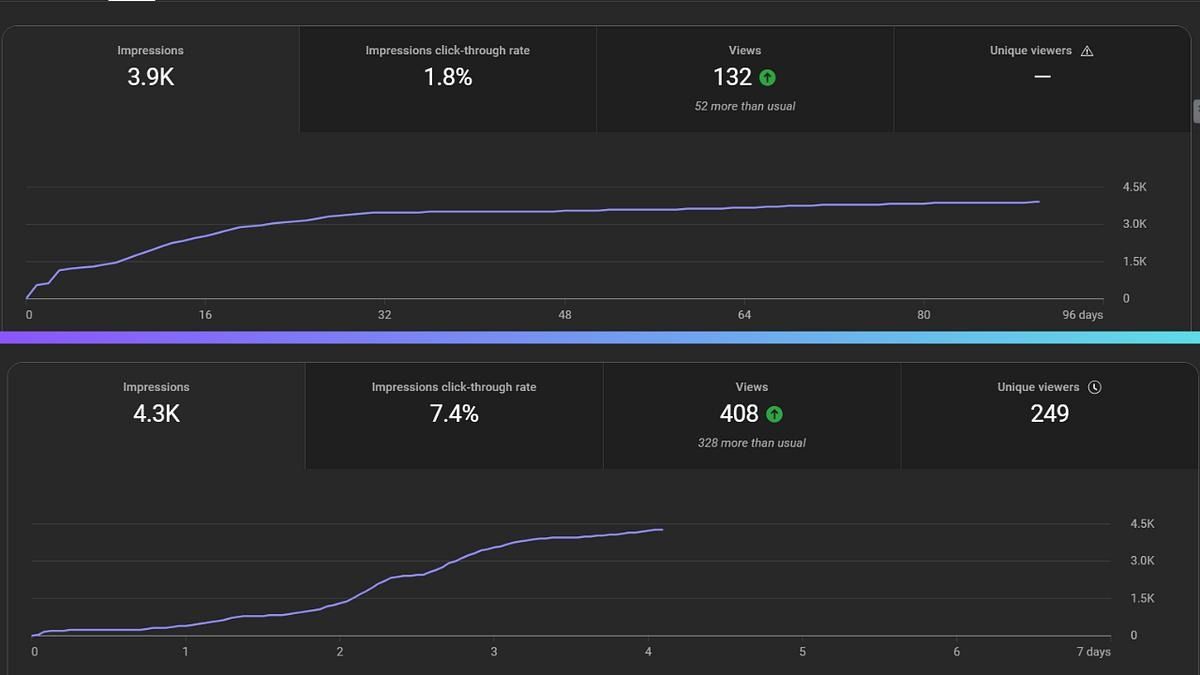
Create at least two variations and test them against each other. This is where real performance gains happen.
Small differences in text, color, or expression can significantly impact your click-through rate, so testing gives you real data instead of guessing.
What makes a thumbnail actually clickable
A clickable thumbnail is not just “good-looking.” It does two jobs at once: it tells the viewer what they are looking at, and it gives them an emotional reason to care immediately. That balance matters more than most creators realize. YouTube itself says viewers usually see the thumbnail and title first, and that this combination helps them decide whether to watch. It also notes that 90% of the platform’s best-performing videos use custom thumbnails.
What is interesting is that strong thumbnails are not always the prettiest ones. Research on nearly 500,000 thumbnails across digital media platforms found that thumbnails with more faces, especially faces showing negative emotions, were associated with higher consumption, while more text was associated with lower consumption. Another study of 16,215 YouTube video covers found that strong sentiment in thumbnails, whether positive or negative, was linked to more views. In other words, the thumbnail that wins is often the one that makes people feel something fast, not the one with the most polished design.
Here is what that usually looks like in practice:
- Clear emotion beats neutral visuals: YouTube specifically recommends using actions and emotions that are universally relatable for casual viewers, like a shocked face. Research backs that up: emotionally charged thumbnails tend to pull more views than flat ones.
- Less text is often better: One large-scale study found that more text in thumbnails decreased consumption. Text can help, but only when it is short, bold, and instantly readable.
- Simplicity matters more than detail: YouTube advises creators not to make thumbnails too complex because too much visual information can overwhelm viewers. That lines up with academic research showing thumbnails need to be both informative and visually appealing, not overloaded.
- A strong title-thumbnail combo works better than either alone: Research on YouTube video covers found that positive titles and emotionally strong thumbnails work together especially well. A weak title can drag down a strong thumbnail, and the reverse is true, too.
Clarity comes first
Before a thumbnail creates curiosity, it needs to make sense. If someone cannot understand the basic idea in a split second, they move on. That is why some thumbnails fail even when they look impressive. They are visually busy, but conceptually vague. YouTube’s own guidance is to avoid overly complex designs and use composition intentionally, including techniques like the rule of thirds, so the viewer’s eye knows where to land first.
A useful way to think about it is this: your thumbnail should answer one fast question before it raises another one. The viewer should instantly understand the subject, then feel curious enough to click. If it creates confusion before curiosity, it loses.
Emotion is a performance lever, not just a style choice
This is where thumbnails get interesting. A lot of creators treat facial expressions like a YouTube cliché, but the data suggests there is a reason they keep showing up. The large-scale 2024 study on thumbnail design found that more faces, especially with negative emotion, fostered more consumption. The separate YouTube cover study also found that strong sentiment in thumbnails led to more views. That does not mean every thumbnail needs fake shock-face energy. It means emotion helps viewers process stakes quickly.
Why? Because emotion signals relevance. A worried face suggests risk. A stunned face suggests surprise. A proud expression suggests transformation or payoff. You are not just showing a person. You are showing the viewer how this story is going to feel.
Curiosity works best when it is controlled
A strong thumbnail should not explain everything. It should reveal enough to make the click feel necessary. The research on YouTube covers connects stronger sentiments in thumbnails with higher views and points to the curiosity-gap effect as one reason emotionally loaded covers attract clicks. This is the sweet spot: enough clarity to understand the topic, enough tension to want the answer.
That is why thumbnails often work best when they focus on a single unexpected image, a reaction, or a strong contrast rather than a full summary of the video. You are not designing a poster. You are creating an open loop.
Text should support the image, not compete with it
A lot of creators assume adding more words makes a thumbnail more informative. Usually, it just makes it harder to process. The research on nearly 500,000 thumbnails found that more text decreased consumption, which is a great reminder that thumbnails are not mini blog posts. And YouTube recommends using easy-to-read fonts and remembering that thumbnails appear differently across devices, which makes readability even more important.
The best thumbnail text usually does one of three things:
- adds context that the image cannot show on its own
- sharpens the hook in two to four words
- highlights the payoff or tension
Anything beyond that usually belongs in the title, not the thumbnail.
One focal point usually wins
This might be the least obvious rule, but it matters a lot. Academic research on 3,745 branded YouTube videos found that thumbnail performance is shaped by both informativeness and visual appeal. That sounds abstract, but the practical takeaway is simple: if too many elements compete for attention, the viewer has to work harder, and that is rarely a winning strategy on YouTube.
The best thumbnails usually have one dominant thing to notice first:
- one face
- one object
- one dramatic action
- one visual contrast
Everything else should support that focal point, not fight it.
The real goal is not beauty, it is instant value
This is the part worth remembering. A clickable thumbnail is not necessarily the most artistic one. It is the one that communicates value the fastest. YouTube even recommends experimenting with thumbnail updates over time because styles shift and audience preferences change. That alone says a lot: thumbnails are not static design assets. They are performance assets.
So when you are judging a thumbnail, do not just ask, “Does this look good?” Ask:
- Can I understand it instantly?
- Does it make me feel something?
- Is there one clear thing to look at?
- Would I stop scrolling for this?
That is usually the difference between a thumbnail that fills space and one that earns clicks.
Common thumbnail mistakes that kill CTR
Most thumbnails do not fail because they are terrible. They fail because they miss one or two critical details that quietly reduce clicks. And the tricky part is that these mistakes often look “fine” at first glance, especially when you have been staring at your own design for too long.
Here are the ones that tend to hurt performance the most.
Too much going on
When everything is important, nothing is.
Creators often try to show the whole story in one image. Multiple objects, text, effects, backgrounds, arrows, emojis. The result is a thumbnail that takes too long to process.
The problem is simple. On YouTube, viewers are scrolling fast. If your thumbnail requires effort to understand, it gets skipped.
Fix: Focus on one clear idea and remove anything that does not support it.
No clear focal point
A strong thumbnail tells your eyes exactly where to look first. A weak one makes you search for it.
This usually happens when:
- the subject blends into the background
- multiple elements compete for attention
- nothing stands out clearly
Even if the idea is good, the lack of hierarchy kills clarity.
Fix: Make one element dominant. Use contrast, size, or positioning to guide attention instantly.
Weak contrast and poor readability
A thumbnail might look good on a large screen but completely fall apart on mobile, which is where most viewers are.
Common issues:
- text blends into the background
- colors are too similar
- details get lost when scaled down
YouTube thumbnails are small. If it is not readable at a glance, it does not work.
Fix: Use bold colors, strong contrast, and test your thumbnail at small sizes before uploading.
Generic or emotionless visuals
This is one of the biggest silent killers.
A neutral face, a standard product shot, or a predictable layout does not give the viewer a reason to care. It might look clean, but it does not create urgency or curiosity.
As research shows, thumbnails with stronger emotional signals tend to perform better. If there is no emotion, there is no hook.
Fix: Exaggerate expression slightly, highlight stakes, or introduce a clear moment of tension.
Copying trends without understanding them
You have probably seen this before. A creator copies a popular thumbnail style, but it does not perform the same way.
That is because trends are not formulas. They work in specific contexts.
For example:
- a shocked face works when there is actual surprise
- bold text works when it adds meaning
- arrows and circles only work when they guide attention clearly
Without context, these elements feel forced and lose impact.
Fix: Understand why a thumbnail works before trying to recreate it.
Relying on one version only
This is one of the most overlooked mistakes.
You create a thumbnail, upload it, and hope it performs. But small changes in text, color, or composition can significantly impact click-through rate.
If you never test alternatives, you are leaving performance up to chance.
Fix: Create at least two variations and compare results. Even small tweaks can make a big difference.
Over-trusting AI without refining
AI can get you 80% of the way there, but that last 20% is what separates a decent thumbnail from a high-performing one.
Common issues:
- slightly off expressions
- awkward text placement
- unnecessary elements
If you just generate and upload, you are missing the opportunity to improve.
Fix: Treat AI as a starting point. Refine, tweak, and polish until everything feels intentional.
How AI fits into a smarter YouTube workflow
If you zoom out for a second, thumbnails are not a separate task. They are part of a system. The creators who grow consistently are not just making better videos, they are building workflows that make every step faster, easier, and more repeatable.
This is where AI starts to make a real difference.
Instead of treating each piece of content like a one-off project, you can turn your workflow into something more streamlined:
- edit your video faster
- generate multiple thumbnail options in minutes
- add subtitles without manual work
- reformat content for different platforms
- test and iterate without slowing down
The key shift is not just speed. It is how easily you can move between steps without losing momentum.
For example, instead of exporting your video, opening another tool, designing a thumbnail from scratch, then going back again, everything can happen in a more connected flow. You edit, generate visuals, refine, and publish without constantly switching contexts.
That is where tools like Async fit in naturally. Rather than focusing on a single feature, it brings parts of the workflow together, from editing to AI-powered thumbnails, so you can create, test, and iterate in one place. It is less about replacing your process and more about removing friction inside it.
And that matters more than it sounds.
Because the easier your workflow becomes, the more you create. The more you create, the more you can test. And the more you test, the better your results get over time.
So while thumbnails are one of the biggest levers for clicks, the real advantage comes from how quickly and consistently you can improve them as part of your overall content system.
Now go get more clicks
At this point, you are not just thinking about thumbnails as visuals anymore. You are thinking about them as decisions that shape whether your content gets seen or ignored.
You know that better thumbnails do not come from more effort, but from better clarity, stronger emotion, and faster iteration. That is what actually moves your click-through rate.
The biggest shift here is simple. Stop treating thumbnails like a final step. Treat them like a lever. Something you can test, refine, and improve over time.
Because the creators who win are not guessing. They are experimenting.
So the next time you upload a video, do not settle on the first version. Generate a few options, tweak them, and see what actually works. Small changes can lead to big differences in performance.
And if you want to make that process faster and a lot less frustrating, using an AI YouTube thumbnail generator can help you go from idea to multiple strong options in minutes instead of hours.
Now it is your turn. Open your next video, rethink your thumbnail, and give it a better shot at getting the click.
FAQs
What is the best AI YouTube thumbnail generator?
The best AI YouTube thumbnail generator is one that lets you quickly create, refine, and test multiple variations. Look for tools that support reference images, prompt-based editing, and easy iteration. The goal is not just design, but speed and flexibility so you can improve click-through rate through testing, not guesswork.
Can AI create clickable YouTube thumbnails?
Yes, AI can create highly clickable thumbnails, especially when combined with strong inputs. It can generate concepts, suggest layouts, and speed up production, but the best results come from refining outputs. Human judgment still matters for clarity, emotion, and storytelling, which are key factors that drive clicks.
How do I write prompts for thumbnail generators?
Start with a clear idea of your video, then describe what should appear in the thumbnail. Include subject, emotion, text, and style. Be specific rather than vague. If needed, you can use tools like ChatGPT to structure your prompt into something more detailed and effective.
How to generate thumbnails for YouTube?
To generate YouTube thumbnails, start with a clear idea and gather reference images such as your face, product shots, or inspiration from viral videos. Then use an AI thumbnail generator to create multiple concepts based on your prompt. Refine the best option, adjust elements if needed, and export a few variations to test performance.
What do YouTubers use for making thumbnails?
YouTubers use a mix of tools depending on their workflow. Traditional options include Adobe Photoshop and Canva for manual design. More recently, many creators are switching to AI thumbnail generators to speed up creation, generate ideas faster, and test multiple versions without spending hours designing from scratch.
Do thumbnails really affect YouTube views?
Yes, thumbnails directly impact click-through rate, which influences how often your video is shown. A stronger thumbnail leads to more clicks, more watch time, and better distribution. Even a great video can underperform if the thumbnail fails to attract attention in the first place.
PakarPBN
A Private Blog Network (PBN) is a collection of websites that are controlled by a single individual or organization and used primarily to build backlinks to a “money site” in order to influence its ranking in search engines such as Google. The core idea behind a PBN is based on the importance of backlinks in Google’s ranking algorithm. Since Google views backlinks as signals of authority and trust, some website owners attempt to artificially create these signals through a controlled network of sites.
In a typical PBN setup, the owner acquires expired or aged domains that already have existing authority, backlinks, and history. These domains are rebuilt with new content and hosted separately, often using different IP addresses, hosting providers, themes, and ownership details to make them appear unrelated. Within the content published on these sites, links are strategically placed that point to the main website the owner wants to rank higher. By doing this, the owner attempts to pass link equity (also known as “link juice”) from the PBN sites to the target website.
The purpose of a PBN is to give the impression that the target website is naturally earning links from multiple independent sources. If done effectively, this can temporarily improve keyword rankings, increase organic visibility, and drive more traffic from search results.